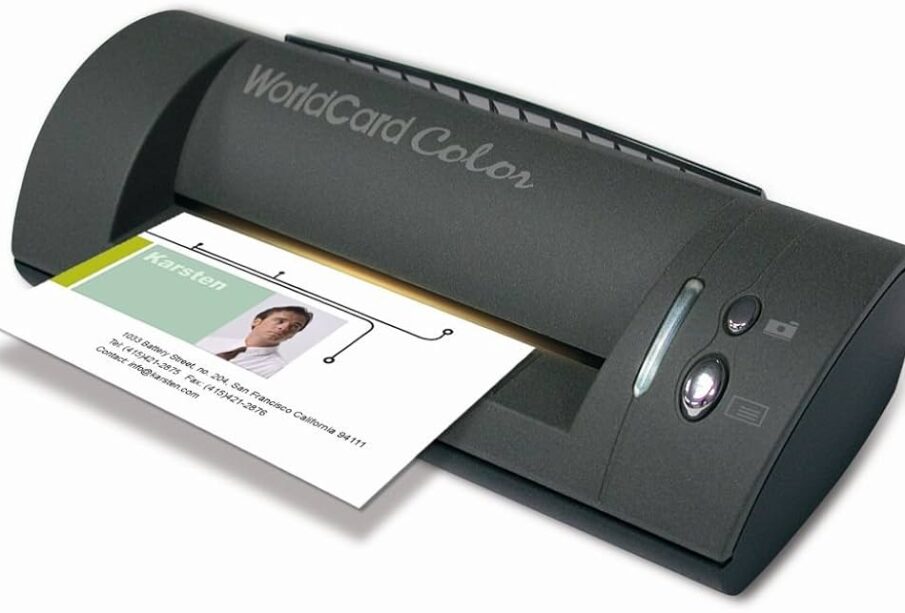
Business Card Scanners convert the information on a physical card, including name, phone number, email, company, and title, into a digital contact record automatically using optical character recognition. For most professionals in 2025, a mobile app scanner like CamCard, Sansan, or the built-in scanner in HubSpot or Salesforce is the fastest and most practical solution. Dedicated hardware scanners are only worth it if you are processing hundreds of cards per week.
The real value isn’t the scanning itself – it’s what happens next. A card sitting in your drawer is a dead lead. A card scanned, tagged, and added to your CRM with a follow-up reminder is a live opportunity. The best business card scanners are the ones that make the ‘what happens next’ part effortless.
Types of Business Card Scanners
| Type |
How It Works |
Best For |
| Mobile App (AI/OCR) |
Photograph card with phone; AI extracts text |
Professionals attending events 1-3x per month |
| CRM-Integrated Scanner |
Scan within your CRM app (HubSpot, Salesforce) |
Sales teams already using a CRM |
| Dedicated Hardware Scanner |
Desktop device feeds cards through for batch scanning |
Receptionists, trade show teams, high volume |
| Smartphone NFC / Digital Cards |
No scanning needed; tap phones to exchange |
Networking events, modern-first professionals |
Top Business Card Scanners Compared
| Scanner |
Type |
Best For |
CRM Integration |
Price |
| CamCard |
Mobile app |
Frequent networkers |
Salesforce, HubSpot, others |
Free / $8/mo |
| ABBYY Business Card Reader |
Mobile app |
Accuracy-focused users |
CRM export via CSV |
Free / $9.99/mo |
| Sansan |
Enterprise app |
Sales teams, Japan market |
Full CRM sync |
Custom pricing |
| HubSpot Card Scanner |
CRM-integrated |
HubSpot users |
Native HubSpot |
Free with HubSpot |
| Salesforce Card Scanner |
CRM-integrated |
Salesforce users |
Native Salesforce |
Included in plan |
| Doxie Go SE |
Hardware scanner |
Office / high volume |
Export to Evernote, CSV |
$149 one-time |
| Fujitsu ScanSnap |
Hardware scanner |
Batch processing, office teams |
Via software |
$259-$429 |
| Linq |
Digital NFC card |
Modern networkers |
Connects to CRM via link |
$60-$99/year |
Key Features to Look For
- OCR accuracy – How well does it handle non-standard fonts, thick card stock, or cards with dark backgrounds? Test before committing.
- CRM integration – If you use Salesforce, HubSpot, Zoho, or Pipedrive, make sure the scanner syncs directly. Manual export/import wastes time.
- Multi-language support – International business? Verify the scanner handles languages you’ll encounter.
- Tag and note adding – Can you add a note right after scanning? (‘Met at HubSpot conference, interested in Q3 services’) This is the detail that turns a scan into a sale.
- Duplicate detection – Prevents creating two records for the same contact when you scan an updated card.
Mobile App vs Hardware Scanner: Which Is Right for You?
|
Mobile App |
Hardware Scanner |
| Cost |
Free-$15/month |
$150-$500 one-time |
| Speed |
15-30 seconds per card |
Batch: 10-30 cards per minute |
| Portability |
Always with you |
Office/desk only |
| Accuracy |
85-97% (varies by app) |
95-99% (consistent) |
| CRM Sync |
Usually direct integration |
Usually via export |
| Best volume |
1-20 cards/week |
50+ cards/week |
How to Get Maximum Value from Scanned Cards
- Scan immediately at the event, not later. Memory fades fast – add a note while the conversation is fresh.
- Tag every contact by source (e.g. ‘TechCrunch 2025’) so you can filter and follow up by event later.
- Set a follow-up reminder for within 48 hours – the window where a new contact still remembers you.
- Connect on LinkedIn before your follow-up email – it warms the touch and gives them a chance to see your profile before you reach out.
Best Scanner by Use Case
| Use Case |
Best Pick |
| Solo professional, occasional networking |
CamCard (free tier) or HubSpot scanner |
| Sales rep using Salesforce |
Salesforce native card scanner |
| Event/trade show team scanning 100+ cards |
Fujitsu ScanSnap + batch export to CRM |
| International business development |
ABBYY Business Card Reader (strong multi-language) |
| Modern-first networker (prefers no paper) |
Linq NFC digital card |
| Startup team needing free solution |
HubSpot or CamCard free tier |